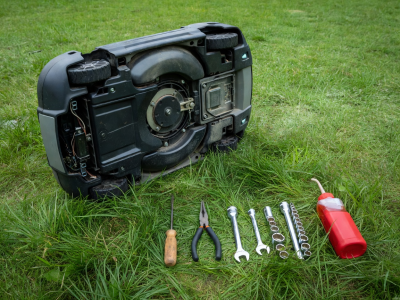
A robotic lawn mower eliminates the sweating, pushing, and fuel-mixing associated with traditional lawn care, but it is not entirely a "set it and forget it" machine. Because they operate daily in harsh, dirty environments, these precision electronic tools require consistent, minor upkeep to preserve battery life, ensure safety, and deliver a clean cut.
Establishing a basic maintenance routine is simple and typically requires less than 15 minutes of labor a month. Below is a comprehensive breakdown of weekly, monthly, and seasonal upkeep tasks.
Chassis and Undercarriage Cleaning
Unlike standard mowers which use heavy updraft to eject grass, robotic mowers act as continuous mulchers. Wet grass clippings can quickly build up beneath the cutting deck, caking around the blade disc and the wheel treads. If left unchecked, this mud limits mobility, strains the drive motors, and dramatically reduces battery efficiency.
- Dry Brushing (Weekly): Turn the mower off, flip it over, and use a stiff-bristled brush or an old dish brush to scrape away dried grass from the cutting disc and wheels.
- Washing (Varies): Check your owner's manual before using water. Some modern mowers carry an IPX5 or higher waterproof rating, allowing you to gently hose off the undercarriage. If your model lacks this rating, strictly use a damp cloth and a brush; a hose can easily destroy the sensitive motherboard.
Blade Replacement
Robotic mowers predominantly use free-swinging, razor-style blades mounted on a spinning disc. These blades are incredibly sharp but quite thin. Because they cut just millimeters of grass every day, they don't dull immediately, but when they do, they will tear the grass rather than slice it, leading to brown, frayed tips on your lawn.
On average, depending on the size of your lawn and the density of your grass, expect to replace these razor blades every six to eight weeks. Changing them requires a standard Phillips-head screwdriver. Always wear thick gloves, replace all blades simultaneously to maintain balance on the disc, and always use the new screws provided in the blade kit to prevent thread stripping.
Battery Health and Charging Contacts
The lithium-ion battery is the most expensive consumable part on a robotic mower. To ensure longevity:
- Clean the Contacts: The copper or steel charging prongs on the front/side of the mower and the corresponding plates on the base station can oxidize or become coated in dirt. Wipe them down monthly with fine emery cloth or a specialized electrical contact cleaner to ensure optimal charging voltage.
- Avoid Deep Discharges: Most software manages this automatically, but never unplug the base station and leave the mower sitting partially discharged on the lawn for weeks.
Winterization and Storage
In regions where grass goes dormant and freezing temperatures set in, proper winter storage is mandatory. Leaving a lithium-ion battery outside in freezing weather will permanently degrade its capacity.
- Bring the mower indoors before the first hard frost.
- Perform a deep clean of the entire unit.
- Fully charge the battery to 100%, then turn off the main power switch.
- Store the mower in a dry, frost-free location (like a heated garage or basement).
- If possible, bring the base station electronics and power supply indoors as well. The boundary wire can remain safely buried under the snow.
Adhering to these basic routines ensures your automated helper stays out of the repair shop and continuously provides that freshly-cut look, year after year.